01 / THE CHALLENGE
Keep the purpose close to the form.
The page asks someone to choose a donation, share personal details, and enter payment information. The design keeps the research mission beside that task and divides the form into a visible sequence.
The form needs enough information to complete the donation, but every additional field adds effort. A visible sequence helps orientation; it does not eliminate the need to question which fields are necessary.
02 / MY ROLE & APPROACH
Connecting the cause with the donation task.
I focused on the donation page from its introductory appeal through the final form action. The interface brings amount selection, personal information, payment details, and a validation example into one visible sequence.
Project timeline · design phases
- 01
Frame the task
Bring the foundation’s purpose close to the donation.
- 02
Organize the experience
Sequence amount, donor information, and payment.
- 03
Resolve the interface
Design the form, preferences, and validation example.
- 04
Prepare for execution
Review labels, error placement, and the final action.
03 / INFORMATION ARCHITECTURE
The appeal and the form, together.
The main areas of the product, and the information each one needs to keep together.
Why give
- Research mission
- Foundation introduction
- Contact information
Donation form
- Preset or custom amount
- Donor information
- Card details
Complete
- Anonymity preference
- Field validation
- Receipt information
04 / USER FLOW
From understanding the cause to choosing a gift.
A useful flow needs to account for what happens when someone cannot take the next step immediately.
- 01Understand the cause
- 02Choose an amount
- 03Add donor details
- 04Review & submit
A required field is missing?
Keep the donor in context and identify the field that needs attention.
05 / DESIGN DECISIONS
Keeping the donation task clear.
Connect the appeal to the action
The research message and contact information sit beside the contribution area. The reason to give remains visible as the donor starts the form.
Break the form into recognizable parts
Amount selection, personal information, and card details have numbered sections. Preset amounts offer a quick choice; a custom field leaves the amount open.
Show the choices and the errors
The layout includes an anonymous-donation option, persistent field labels, and an inline required-field example. Receipt information appears near the final submission step.
06 / THE WORK
A closer look at the details.
Explore the screens below. Scroll through a longer page or open it for a closer look.
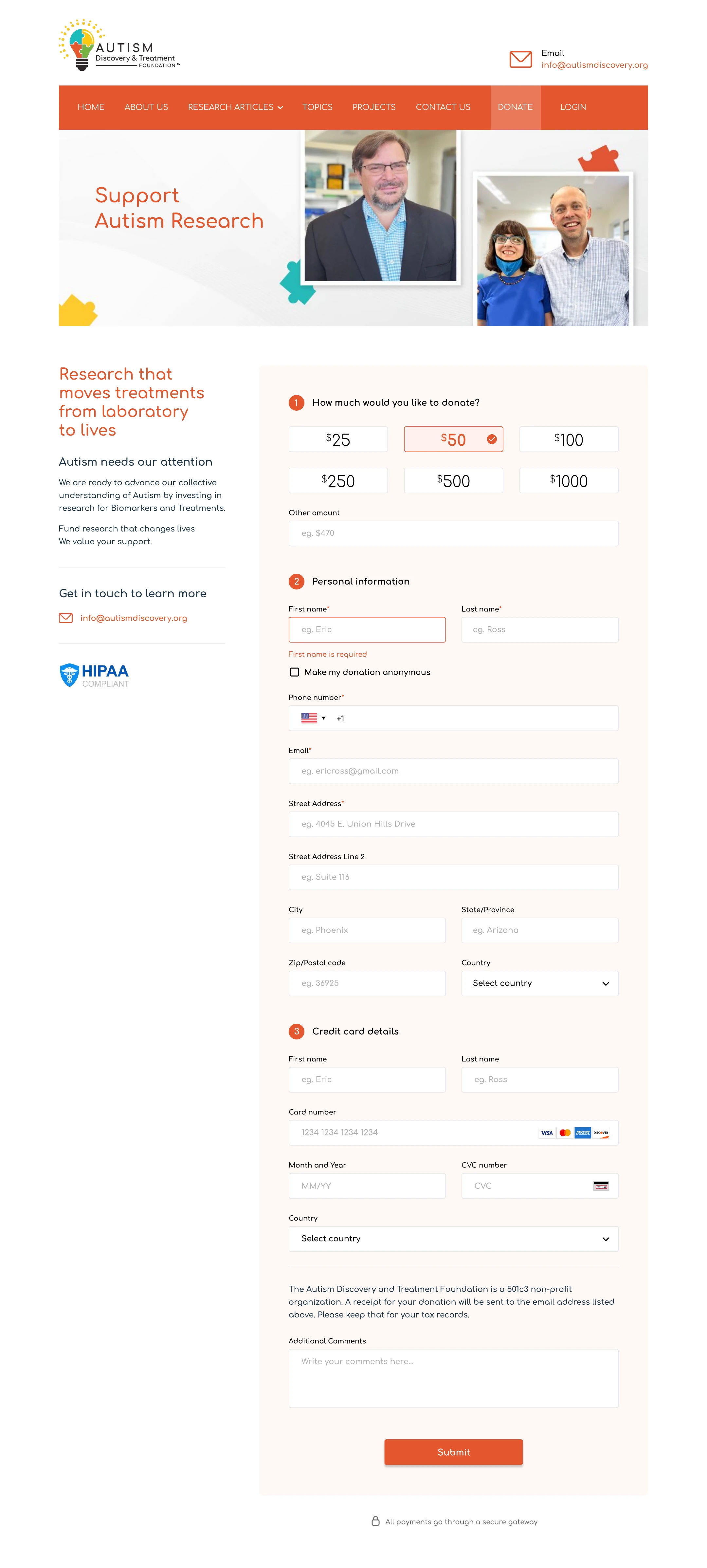
The native export includes the mission, numbered form sections, preferences, and validation. Scroll inside the browser to follow the full page.
Open full design ↗07 / DESIGN INTO DEVELOPMENT
Building an accessible donation form.
The form needs persistent labels, programmatically associated errors, and a clear keyboard order. A production payment flow also needs secure payment-provider integration and a reliable receipt state; those responsibilities cannot be established by a static screen alone.
08 / REFLECTION
A connected donation journey.
The design covers the main form and a validation example. Form length, optional information, and recovery after an error deserve further attention. Payment processing and compliance are implementation responsibilities, not outcomes established by the visual design.
I would test form completion, error recovery, and the interpretation of anonymity. A next iteration should examine optional fields and validate the payment and receipt journey with the implementation team.